I spent the better part of three years turning a 1967 colonial in the western suburbs of Chicago into something resembling a smart home. I did it wrong the first time. Then I did it wrong a second time, just differently. By the third pass I had a system that actually worked, and I had also donated about $300 to a junk drawer full of devices that died like casualties of a campaign nobody asked for.
That drawer is why this guide exists. I would like to keep you out of it.
If you are trying to figure out how to set up smart home automation from scratch in 2026, I will walk you through the whole thing, from picking a voice assistant to building automations that make your life easier instead of just handing you more apps to babysit. No prior experience required. No electrical engineering degree. Just a Wi-Fi connection and a willingness to read past the marketing.
Table of Contents
- The Reality Check You Deserve Before Spending a Dime
- Choosing the Brain: Your Hub and Voice Assistant
- Protocols, Standards, and the Alphabet Soup That Actually Matters
- Your First Devices: Start Small or Regret Everything
- Preparing Your Network So Nothing Catches Fire (Metaphorically)
- The Actual Step by Step Setup, No Fluff Allowed
- Building Automations That Don’t Make You Feel Like a Beta Tester
- Mistakes I Made So You Don’t Have To
- The Great Comparison Table of 2026
- Frequently Asked Questions
- Go Forth and Automate
The Reality Check You Deserve Before Spending a Dime
The smart home industrial complex wants you to believe that automation means gutting your house and replacing every appliance with a version that has the word “smart” stamped on the box. I say this with the full weight of three years and one junk drawer: that is nonsense.
You do not need a $400 Wi-Fi coffee maker. You need a $12 smart plug and the coffee maker you already own.
You do not need to automate your whole house on day one. You need to fix the two or three things that quietly annoy you every single day. The porch light you forget every night. The basement that glows like a stadium at halftime because the kids walked away. The garage door you check at 11pm by putting pants back on and walking down there in the cold.
Those are problems. And problems have cheap, specific solutions. Products do not.
The real secret to setting up smart home automation from scratch is this: start with problems, not products. What actually bugs you about your house right now? Write that down. That list is your shopping list. Everything else is impulse buying wearing a home-improvement costume.
💡 Quick tip: Before you buy anything, write down three to five daily annoyances about your home. That list becomes your plan. It will also save you from the drawer.
Choosing the Brain: Your Hub and Voice Assistant
Every smart home needs a central nervous system. Something that talks to your devices, runs your automations, and lets you bark orders from the couch without getting up. In 2026 you have three realistic choices, and all three work. The only real question is which one fits the phones already in your house.
Amazon Alexa: The Swiss Army Knife
Alexa still has the widest device compatibility of anything out there. If a product exists with “smart” on the box, there is almost certainly an Alexa skill for it. The Echo Hub, Amazon’s wall-mounted control panel, has turned into a genuinely useful command center instead of a gimmick. For a household that just wants everything to work with the least friction, Alexa is the pragmatic pick.
The trade is privacy. Amazon collects voice data. You can delete recordings and tighten the settings, but if you are the kind of person who keeps tape over the laptop camera, this may not be your platform.
1. Amazon Echo Hub, Best For Wide Compatibility and Central Control
The Echo Hub is a touchscreen panel that mounts on the wall or sits on a counter and shows all your devices in one place. It has a Zigbee and Matter radio built in, which means it can talk to a pile of sensors and devices without you buying a separate hub first. If multi-room audio is your goal, I get into speakers in my whole home audio guide.
Mine lives in the hallway between the kitchen and the living room. It shows camera feeds, thermostat status, and locks the front door with one tap. The speaker on it is fine for podcasts and not going to replace a stereo, which is exactly what you should expect from a wall panel. If thermostats are next on your list, I went deep on those in the smart thermostat guide.
💡 Why it earns a spot: the built-in Zigbee and Matter radio means you skip buying a separate hub, which saves $50 to $100 right out of the gate. For most households starting in 2026, it is the best-value front door into the whole thing.
✅ Best for: beginners who want the easiest path to a fully working smart home with voice control.
⚠️ Watch out: the default data collection is aggressive. You will want to walk through the privacy settings by hand.

💰 Price range: $130 to $180
Apple Home: The Privacy Fortress
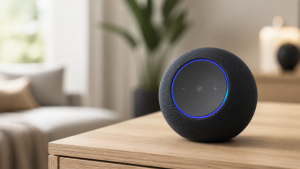
If your household runs on Apple, iPhones, iPads, the whole orchard, then Apple Home is the natural fit. The 2025 and 2026 updates brought much better automation, and the HomePod Mini doubles as a Thread border router and Matter controller. Privacy is best in class. Apple processes voice commands on-device whenever it can and encrypts everything end to end.
The downside is selection. Matter has closed a lot of the gap, but you will still find products that support Alexa or Google and never bothered with Apple certification. It is a walled garden, and Apple makes no apologies about that.
One honest note for 2026: a HomePod Mini 2 has been rumored for later this year, tied to the rebuilt Siri. It is not shipping yet, and Apple has a long history of “soon.” Do not put your project on hold waiting for a speaker that may not show up until fall. The current Mini is the one you can actually buy and build on today.
2. Apple HomePod Mini, Best For Privacy-Conscious Apple Households
A small $99 speaker (Apple’s price; Amazon resellers often mark it up) that pulls triple duty as a voice assistant, a Thread border router, and a Matter hub. The sound punches above its size. Siri has gotten noticeably better at home control, though it will still occasionally hear “turn off the kitchen lights” as a request to play a song from 2014.
You need at least one HomePod or Apple TV 4K to act as your home hub. That part is not optional. It is what runs your automations when your iPhone has left the house. I cover the full Apple stack in my HomeKit Buyer’s Guide.
💡 Why it earns a spot: if everyone under your roof carries an iPhone, this is the most natural starting point. Matter setup is nearly instant, and the privacy protections are unmatched.
✅ Best for: Apple-centric households that care about where their data goes.
⚠️ Watch out: third-party device support is better than it was, but it still trails Alexa.

💰 Price range: $89 to $109 direct; Amazon third-party listings often run higher
Google Home: The Search Brain
Google Home’s strength is natural language. You can phrase things the way a human would and it usually figures out what you meant. The Google Home app finally got the rebuild it needed and is genuinely usable now, and Nest devices fold in cleanly. For a household already living in Gmail, Photos, and Android, it is the path of least resistance.
It sits in the middle on most things. More open than Apple, a little less sprawling than Alexa. If your phones are Android, start here and do not overthink it.
Protocols, Standards, and the Alphabet Soup That Actually Matters
This is the part where most guides lose people. Stick with me, because it matters and I will keep it short.
Smart home devices talk over wireless protocols. Think of a protocol as a language. If your hub speaks Spanish and your bulb speaks Mandarin, nothing happens when you say “turn on.” Here is what you actually need to know in 2026.
Wi-Fi: devices connect straight to your router. Easy to set up. But every device eats bandwidth, and once you have 30 of them your router starts sweating like a freshman giving a speech. Best for things you only own a few of, like smart plugs and cameras. Some gear skips Wi-Fi entirely, which I get into in smart home devices that work without Wi-Fi.
Zigbee: a low-power mesh protocol. Devices relay signals for each other, so range gets better as you add more. Needs a hub. Mature, reliable, wide selection. Its older cousin Z-Wave runs on the same mesh idea on a different radio band, and I put all three head to head in Zigbee vs Z-Wave vs Thread. I still have Zigbee sensors from 2021 running on their original batteries.
Thread: the new kid that actually earned the hype. Low-power mesh like Zigbee, but it talks directly to your home network and forms the backbone of Matter. If you are starting fresh in 2026, Thread-capable devices are the smartest long-term bet.
Matter: not a protocol exactly, but an application layer that rides on top of Thread and Wi-Fi. Matter is the universal translator. A Matter-certified bulb works with Alexa, Apple Home, Google Home, and Samsung SmartThings. No extra apps. No proprietary bridges. It is the thing the industry should have built a decade ago, and in 2026 it is finally mature enough to trust.
💡 Quick tip: when you shop, look for the Matter logo on the box. It is a small three-arrow icon. If a device has it, you know it works with whatever platform you picked. If it does not, ask yourself why the manufacturer could not be bothered.
Your First Devices: Start Small or Regret Everything
I have watched people walk into Amazon, throw $600 of smart home gear into a cart, and walk out with a pile of half-configured devices and a deep sense of regret. Do not be that person. Here is the order I would buy in, broken into phases.
Phase 1: The Foundation ($100 to $200)
One voice assistant or hub (Echo Hub, HomePod Mini, or Nest Hub). Two to four smart plugs. Two to four smart bulbs for the rooms you actually use after dark. That is the whole list. Live with it for two weeks. Learn the app. Set up a few voice commands. Notice what works and what annoys you. Then, and only then, move on.
3. TP-Link Kasa Smart Plug (KP125M), Best For Beginners on a Budget
The Kasa KP125M is a Matter-compatible smart plug with energy monitoring built in. It is small enough that it does not block the second outlet, a problem that quietly plagues an embarrassing number of smart plugs. Setup takes about two minutes through the Kasa app or straight through your Matter controller.
I run these on lamps, the coffee maker, a box fan in the bedroom, and a space heater in my office with an automation that kills the power if it has been on for more than two hours. The energy monitoring turned out to be more useful than I expected. It is how I caught my old basement dehumidifier quietly eating electricity like it was being paid to, and the replacement paid for itself in about four months.
💡 Why it earns a spot: under $15 a plug, Matter compatible, and energy monitoring included. The price-to-usefulness ratio is the best in the smart plug category for 2026.
✅ Best for: anyone starting out who wants cheap, reliable control of dumb appliances.
⚠️ Watch out: Wi-Fi only, no Thread. Fine for a handful, but do not put 20 of them on your network and expect a good time.

💰 Price range: $11 to $16 per plug
4. Philips Hue Starter Kit (with Hue Bridge), Best For Smart Lighting That Actually Lasts
Yes, Philips Hue costs more than the no-name bulbs three rows down on Amazon. And yes, it is worth it. I have had Hue bulbs running for four years without a single failure. The color is accurate, the dimming is smooth, and the Zigbee-based Hue Bridge keeps these bulbs off your Wi-Fi entirely. The starter kit gets you the bridge and three or four bulbs depending on the package you grab.
Hue added Matter support, so the bulbs play nicely with whatever platform you chose without any fiddling. The app has improved, though I still do most of my control through voice or automations. For the full picture on lighting, I laid it out in my whole-house smart lighting guide.
💡 Why it earns a spot: the reliability over years of daily use is what separates Hue from the cheap stuff. These bulbs just keep working, and Matter support future-proofs the money you put in.
✅ Best for: homeowners who want the gold standard of smart lighting and do not want to think about it again.
⚠️ Watch out: premium pricing. Budget $60 to $80 for the starter kit and $15 to $25 per extra bulb.

💰 Price range: $60 to $140 for starter kits
Phase 2: Getting Serious ($100 to $200 more)
Motion sensors for hallways and bathrooms, because lights that turn on when you walk in and off when you leave feel like living in the future. A smart lock for the front door. A door or window sensor for the garage or anywhere you want to keep an eye on. This is the phase where the house stops being a collection of voice-controlled gadgets and starts anticipating you.
5. Aqara Motion Sensor P2, Best For Automations and Room Awareness
The Aqara P2 is a Thread motion and light sensor, and it is tiny. You stick it in a corner with the included adhesive and forget it exists until the day you realize the bathroom light has been turning on by itself for three months and you cannot imagine flipping a switch like some kind of animal ever again.
Thread connectivity means it reacts almost instantly. The older Zigbee version had a slight lag that was barely noticeable. The P2 is borderline telepathic. It also works directly with Matter, so you skip the Aqara hub entirely if your main hub already speaks Thread. I get into the full sensor lineup in my smart home sensors guide.
💡 Why it earns a spot: Thread and Matter native for under $25. This is the sensor that unlocks the automations that make a smart home feel actually smart instead of just voice-controlled.
✅ Best for: anyone who wants lights and routines triggered by presence, not just by talking to a speaker.
⚠️ Watch out: it needs a Thread border router (a HomePod Mini, Echo Hub, or similar) to do its job. It runs on two CR2450 batteries that are good for around two years, so this is not a device you will be babysitting.

💰 Price range: $18 to $25
6. Yale Assure Lock 2, Best For Keyless Entry That Doesn’t Look Like a Spaceship
I have a thing about smart locks that look like they belong on the bridge of a starship. The Yale Assure Lock 2 looks like a lock. A nice lock. It comes in several finishes, supports Matter over Thread, and has a keypad for entry codes, so you can hand the dog sitter a temporary code instead of hiding a key under a rock like it is 1994.
Installation takes 15 to 20 minutes with a screwdriver and it fits a standard deadbolt hole. The auto-lock means I no longer lie in bed wondering if the front door is locked, because it locks itself after 30 seconds. My wife says that single feature justified the entire project. For more options, including the rental angle, see my smart locks guide.
💡 Why it earns a spot: Matter and Thread support, a clean design, and a keypad make this the most versatile smart lock for 2026. It works with every major platform out of the box.
✅ Best for: homeowners who want keyless convenience without the sci-fi aesthetic.
⚠️ Watch out: depending on the finish and the wireless module you pick, this is the priciest device on the list. Buy the module that matches the platform you chose.

💰 Price range: $170 to $260 depending on finish and module
Preparing Your Network So Nothing Catches Fire (Metaphorically)
Here is the thing nobody tells you in the glossy “smart home in 10 minutes” articles. Your network is the foundation. If your Wi-Fi is shaky, your smart home will be shaky. If your router is the one your ISP handed you in 2019, it is time.
You do not need enterprise gear. You need a decent mesh Wi-Fi system. The TP-Link Deco and Eero systems work well for most homes and run $150 to $250 for a three-pack that covers up to 5,000 square feet.
My old house has plaster walls with wire mesh inside them. Radio signals treat that mesh like a prison wall. I burned through three routers before I accepted that a mesh system with a node on each floor was the only real answer. Best $200 I spent on the whole project.
Set Up a Separate Network for Your Devices
If your router supports it, and most mesh routers now do, put your smart home devices on a separate guest or IoT network. That keeps your cameras and plugs walled off from the laptops and phones that hold your actual life. It is a basic step, but it is a meaningful one for security.
The 2.4GHz vs 5GHz Situation
Most smart home devices use 2.4GHz Wi-Fi. It is slower but it reaches farther and punches through walls better. If your mesh router assigns bands automatically, and most do now, your smart devices usually land on 2.4GHz on their own. But if a device refuses to set up, check that you have not somehow forced your network to 5GHz only. That one setting has caused more troubleshooting headaches in my house than anything else.
The Actual Step by Step Setup, No Fluff Allowed
Alright. You have a hub, a few plugs, a few bulbs. Here is the actual order of operations, written to cause the least possible frustration.
Step 1: Set Up Your Hub or Voice Assistant
Plug it in. Download the app (Alexa, Apple Home, or Google Home). Create an account. Follow the on-screen setup, which will walk you through it. Name your home and create your first room, “Living Room,” “Kitchen,” whatever matches your house. That room structure matters, because it is how voice commands get routed. When you say “turn off the bedroom lights,” the system needs to know which devices live in the bedroom.
Step 2: Add Your Smart Plugs First
Smart plugs are the easiest devices to set up and the fastest way to feel like the project is working. Plug them in, open the app, tap “add device.” Most Matter plugs show up on their own. Assign each one to a room and give it a name you would actually say out loud. “Coffee maker” is good. “Smart Plug 3” is useless. You will be speaking these names to a voice assistant, so pick something natural.
Step 3: Add Your Smart Bulbs
If you are using Hue, set up the Hue Bridge first: plug it into your router with ethernet, open the Hue app, pair the bulbs, then connect the bridge to your main platform over Matter. If you are using standalone Matter bulbs, add them straight through your hub’s app. Name them clearly. “Desk lamp” is good. “Living room ceiling” is good. “Bulb” is worthless.
Step 4: Test Voice Commands
Before you add anything else, test what you already have. “Turn on the coffee maker.” “Set the living room lights to 50 percent.” “Turn off everything.” If any of those fail, fix it now. Do not build on a broken foundation. I made that mistake once and ended up with 15 devices in a half-working configuration that ate an entire Saturday to untangle.
Step 5: Add Sensors and Locks
Once the basics are solid, add your motion sensors, door sensors, and the smart lock. These are the devices that make real automation possible, the stuff that happens without you saying or tapping a thing.
Step 6: Build Your First Automation
This is where it gets good, and it is the whole point of the next section.
Building Automations That Don’t Make You Feel Like a Beta Tester
An automation is a simple “if this, then that” rule. Motion in the hallway after sunset? Turn on the hallway light. Front door unlocked? Turn on the entryway lamp. You do not need to code anything. Every platform has a visual builder where you pick a trigger and an action. Here are the first three I would set up.
Automation 1: Goodnight routine. When you say “goodnight” to your voice assistant, or tap a button in the app, it turns off all the lights, locks the front door, drops the thermostat to your sleeping temperature, and turns on the bedroom fan if you use one. This single routine replaced about six things I used to do by hand every night. It feels like having a butler, if the butler were a small plastic cylinder on the nightstand.
Automation 2: Motion-activated bathroom light. The motion sensor triggers the light to 40 percent at night and 100 percent during the day, then shuts it off five minutes after the last movement. My teenagers will never flip a switch voluntarily, so this one automation probably saves me $10 a month in electricity that used to light an empty bathroom 18 hours a day.
Automation 3: Welcome home. When the front door unlocks, or your phone’s GPS crosses a boundary near the house, turn on the entryway light and set the thermostat back to a comfortable temperature. There is a specific kind of relief in walking into a lit, warm house on a January night in Chicago when both hands are full of grocery bags cutting off your circulation.
💡 Quick tip: every platform lets you add time conditions, so use them. “Turn on the porch light on motion” is fine in the evening, but at 3am you probably want a dim activation or just a notification to your phone instead. Context is the difference between an automation that helps and one that wakes the whole house.
Mistakes I Made So You Don’t Have To
Let me save you some pain. The real kind, the kind that hits at 11:30pm when something breaks and you have a 7am meeting.
Mistake 1: Buying from brands that disappeared. I owned a set of smart bulbs from a company I will not name, mostly because it no longer exists, which is exactly the point. Two years in, the cloud service went dark and the bulbs became very expensive dumb bulbs. Buy from companies that will still be here next year: Philips, TP-Link, Aqara, Yale, Lutron. Matter compatibility adds another layer of insurance, because a Matter device keeps working locally even if the manufacturer’s cloud goes offline.
Mistake 2: Going all in on day one. I ordered 22 devices in a single purchase once. Fourteen of them sat in their boxes for three months because I got buried configuring the first eight. Phase your rollout. Two weeks between phases, minimum.
Mistake 3: Ignoring the family. If the people in your house cannot figure out how to turn on the lights, your smart home has failed. Every room needs a fallback. Physical switches should still work. Voice commands should be obvious. If your spouse has to open three apps to watch TV, you did not build a smart home, you built a monument to yourself.
Mistake 4: Wi-Fi everything. I once had 24 Wi-Fi devices on a standard router. It started dropping connections like a juggler with greased hands. Moving the sensors and bulbs onto Zigbee and Thread through a hub fixed the reliability overnight. Save Wi-Fi for cameras and smart plugs. Put everything else on a mesh protocol.
The Great Comparison Table of 2026
Here is the quick reference, all six picks side by side.
| Device | Category | Protocol | Matter | Price | Best For |
|---|---|---|---|---|---|
| 🏆 Amazon Echo Hub | Hub/Display | Wi-Fi, Zigbee, Thread | Yes | $130-$180 | Best overall starting point |
| Apple HomePod Mini | Hub/Speaker | Wi-Fi, Thread | Yes | $89-$109 | Apple households, privacy |
| TP-Link Kasa KP125M | Smart Plug | Wi-Fi | Yes | $11-$16 | Budget-friendly starter device |
| 🏆 Philips Hue Starter Kit | Smart Lighting | Zigbee (via Bridge) | Yes (via Bridge) | $60-$140 | Reliable, long-lasting lighting |
| Aqara Motion Sensor P2 | Sensor | Thread | Yes | $18-$25 | Automations, presence detection |
| Yale Assure Lock 2 | Smart Lock | Thread | Yes | $180-$260 | Keyless entry, temporary codes |
Frequently Asked Questions
How much does it cost to set up smart home automation from scratch?
You can start a basic smart home for $100 to $200 with a voice assistant, a few smart plugs, and a bulb or two. A more complete setup with a hub, a smart lock, sensors, and lighting runs $400 to $800. You do not need to spend thousands unless you want to. The industry would love you to believe otherwise. Do not let it.
Do I need a hub for smart home automation in 2026?
Not always. Plenty of devices work over Wi-Fi directly. But if you plan on more than 10 to 15 devices, a hub that supports Zigbee, Thread, or Matter will keep your network stable and your automations faster. Think of it as the difference between a solid foundation and building on sand.
What is the Matter protocol and why does it matter?
Matter is a universal smart home standard that lets devices from different brands work together. It launched in late 2022 and has been maturing through 2026. A Matter-certified bulb works with Apple Home, Google Home, Amazon Alexa, and Samsung SmartThings without extra steps. It is the closest thing this industry has come to common sense.
Can I set up smart home automation in a rental apartment?
Absolutely. Stick to no-install devices: smart plugs, bulbs that screw into existing fixtures, wireless sensors, and smart speakers. Avoid anything that needs rewiring or replacing hardware you do not own. You can take all of it with you when you go.
What is the best voice assistant for smart home automation in 2026?
Amazon Alexa has the widest device compatibility. Apple HomeKit has the best privacy and shines if your household runs on iPhones. Google Home is strongest with natural language. There is no wrong answer. Pick the one that matches the phones already in your house and you will be fine.
Will smart home devices slow down my Wi-Fi?
They can, if you connect dozens of Wi-Fi devices to a basic router. That is exactly why Zigbee and Thread exist. They build their own mesh, and only the hub talks to your router. If you are sticking with Wi-Fi-only devices, invest in a good mesh system. It is cheap insurance.
Go Forth and Automate
Setting up smart home automation from scratch in 2026 is easier than it has ever been. Matter turned a compatibility nightmare into something approaching sanity. Thread made devices faster and more reliable. And the barrier to entry is low enough that you can start this weekend with a hub and a couple of plugs.
Start with one or two real problems. Get those working perfectly before you add anything. Resist the siren song of the smart home industrial complex telling you to buy a $300 smart trash can. Yes, that exists. No, you do not need it.
I started this whole project because I was tired of getting out of bed to check whether the front door was locked. Three years later, my house responds to my family’s patterns like a well-trained assistant. The lights adjust on their own. The thermostat knows our schedule. My teenagers still leave every cabinet door open, but at least the lights shut off behind them now.
Some problems, technology cannot solve.
Check current prices on everything I recommended using the links above. Amazon pricing moves around constantly and deals show up often, especially during seasonal sales. The products here are the ones running in my house right now, and they earned their spots by surviving the one thing that kills most smart home gear: actual daily use by actual humans who do not read the manual.