A while back somebody on r/homeassistant asked a deceptively simple question: what small automation ended up saving you the most time? A couple hundred people answered, and here is the part that jumped out at me. Almost nobody bragged about barking commands at a speaker. They wrote about the porch light they haven’t had to think about in two years. The garage door that shuts itself on the way out of the driveway. The coffee that’s already going before the alarm gets a chance to ruin the morning.
That’s the unglamorous middle of this whole hobby, and it’s the part that actually matters. Nobody fires off a breathless press release about a contact sensor flipping on the mudroom light when the back door opens. It doesn’t trend. It just quietly erases one small annoyance a few times a day, every day, more or less forever. Compound interest for your sanity.
So this isn’t a list of party tricks you set up once to make a houseguest say “whoa.” This is about the automations that stick. The ones you forget are even running, because somewhere along the way they stopped being gadgets and just became how the house works.
Table of Contents
- Why Most Automations Quietly Die
- Start With Lights. Nobody Gets Hurt.
- The Cheap Sensors That Earn Their Keep
- Walking In and Out Without Touching a Thing
- Let the Thermostat Sweat the Details
- Waking Up Without the Air-Raid Siren
- Quick Reference: Devices by Automation
- Frequently Asked Questions
Why Most Automations Quietly Die
The ones that last all share a few traits. They’re reliable, meaning they fire when they’re supposed to and stay quiet when they’re not. They’re invisible to everyone else in the house, which is the part people skip. If your spouse or your kids have to open an app, learn the “system,” or care even slightly, the automation is already dead. And they solve a real annoyance, not the kind of micro-friction only a person who reads smart home blogs at 11pm would ever notice.
The ones that fail are almost always too clever. Too dependent on one twitchy sensor, too eager to do something dramatic at the worst possible moment. A light that snaps on by itself at 2am isn’t a feature, it’s a haunting, and it’s worse than no automation at all. Start boring. You can add the clever stuff later, once the boring stuff has earned your trust.
Start With Lights. Nobody Gets Hurt.
Lights are where everybody should start, because the use cases are obvious and the worst case is mild. A light that comes on when it shouldn’t is mildly irritating. A lock that unlocks when it shouldn’t is a problem you read about on the local news. So we begin with the stuff that can’t get anybody hurt.
1. Outdoor Lights on a Sunset/Sunrise Schedule
This is the first automation almost everybody sets up, and then promptly forgets exists, which is exactly the point. Porch light, garage light, driveway lights, all on at sunset and off at sunrise (or whatever hour you stop pretending you’ll go back outside). No switches, no thinking, nobody fumbling up the driveway in the dark with an armful of groceries because the last person out forgot. Smart plugs handle this for any existing outdoor lamp, and dedicated outdoor fixtures cover the permanent installs.
For an outdoor plug that plays nice with HomeKit, Matter, Alexa, and Google Home, the TP-Link Kasa EP40A is the safe money. Weatherproof, dual outlet, and it’s been around long enough that the firmware isn’t a science experiment.

2. Motion-Activated Hallway and Bathroom Lights
The 3am hallway is the most-solved problem in this entire hobby, and somehow still the one that makes first-timers lose their minds. Motion sensor sees you, light eases up to ten percent, you find the bathroom without waking the dog or catching a doorframe with your shin. Everybody who experiences it immediately wants it in every room of the house. (Maverick, my mini-bernedoodle, remains deeply unimpressed by all of it, but he’s a tough crowd.)
The Aqara Motion and Light Sensor P2 is the right place to start. It works natively with HomeKit, Matter over Thread, Alexa, and Google Home, the detection range is dependable, and the built-in light sensor means it only fires when it’s actually dark instead of burning a bulb at noon.
The Cheap Sensors That Earn Their Keep
3. Door and Window Contact Sensor Alerts
Contact sensors are the most underrated twenty dollars in the entire smart home aisle. The uses are endless and genuinely practical: ping your phone when a specific door opens, kick on a light when someone walks into a room, chime when the back gate swings. If you’ve got kids in the house, the “front door just opened while everyone’s supposed to be home” alert pays for the thing ten times over before you’ve finished the setup.
For a household juggling more than one platform, the Aqara Door and Window Sensor P2 speaks Matter and works across all the major ecosystems. I went deeper on which sensors belong in which rooms over in Smart Home Sensors Worth Installing.
4. Water Leak Detection Under the Sink and by the Water Heater
Nobody buys a water leak sensor for the thrill of it. But talk to anybody who’s walked into a soaked subfloor and a five-figure insurance claim, and they will evangelize these things like a convert. Fifteen or twenty bucks, tucked under the kitchen sink or next to the water heater. The day it gets wet, your phone goes off. Catch one slow drip or one washing-machine hose about to let go, and the sensor pays for itself a few thousand times over, plus the week of your life you don’t lose to drying fans and contractors.
The Govee H5054 is the cheap, reliable pick here, and it works with Alexa and Google Home.
Walking In and Out Without Touching a Thing
5. Geofence-Based “Welcome Home” and “Goodbye” Scenes
Location automations are the biggest time-savers on this whole list, and also the ones most likely to flake on you now and then. When they work, it genuinely feels like the house knew you were coming: you roll into the driveway and the lights, the thermostat, and the music volume have already sorted themselves out before you’ve got the car in park. The rule I’d hand anybody is this. Use geofencing for the low-stakes stuff. Lights, climate, ambiance, all fair game. Locks you handle separately, because “the door unlocked because my phone thought I was home” is not a sentence you want to be explaining later. If you need this working for a whole household and not just you, I broke down the multi-person presence setup in Smart Home Automation from Scratch.
6. The Garage Door That Actually Closes Itself
If you’ve got a garage, this is one of the highest-payback automations there is. A sensor that knows whether the door is up, and a routine that shuts it after a set time or once your phone leaves the geofence. The number of times this kills the “wait, did I leave the garage open?” U-turn three blocks from the house is not a small number, and anybody who’s done that drive knows the specific dread. On r/homeautomation the regulars keep steering HomeKit users toward Meross, mostly because it skips the subscription-gating nonsense a couple of the bigger names have started pulling lately.
Let the Thermostat Sweat the Details
7. Thermostat Scheduling and Away Mode
If you don’t have a smart thermostat yet, this is the one with the fattest paper trail behind it. Energy Star data lands around ten to twelve percent off your annual heating and cooling bill from smart scheduling alone, which over a Midwest winter is not pocket change. The two that have aged well are the ecobee (consistently near the top for reliability whether you’re on HomeKit or not) and the Google Nest. I put the full comparison in Smart Thermostats That Actually Cut Your Bills.
Waking Up Without the Air-Raid Siren
8. The Wake-Up Light Routine
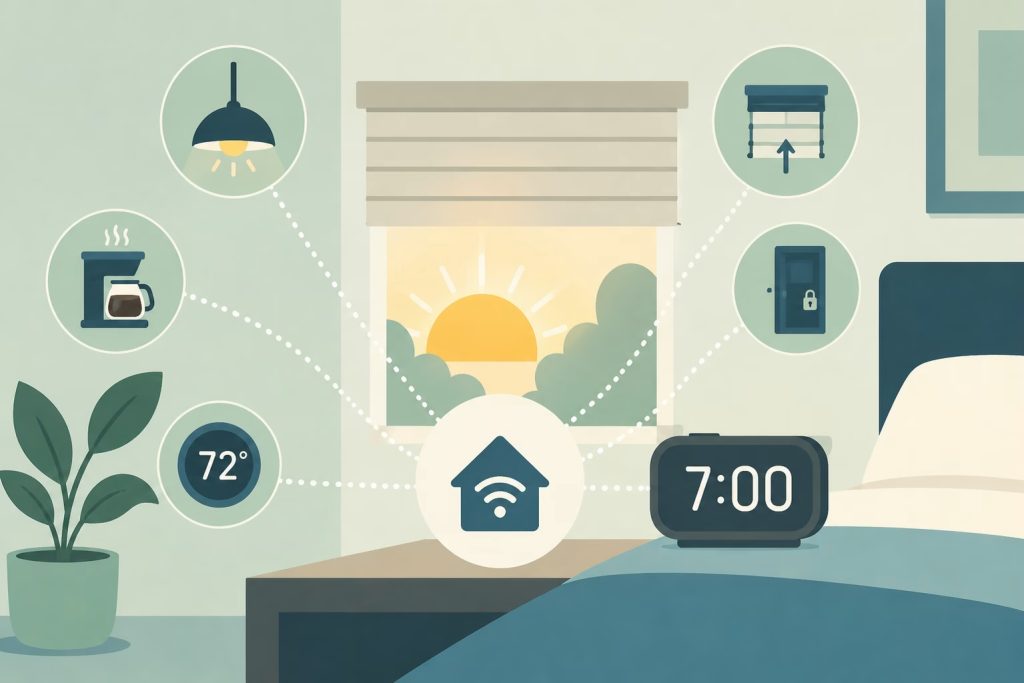
The bedroom lights ease up from black to about thirty percent over ten or fifteen minutes, timed to when you actually want to be vertical. Waking to a slow sunrise instead of a phone shrieking at you in a pitch-black room makes a bigger difference than it has any right to. The circadian research has been saying so for years. And you do not need a two-hundred-dollar branded “wake-up” kit to pull it off. Any decent smart bulb on a schedule does the job.
The LIFX A19 gets recommended for this one a lot, specifically because its color temperature range gives you that very warm, low glow at the bottom of the dimming curve without going weird and blue up top. Bonus: it’s Wi-Fi direct, so there’s no hub to babysit.
Quick Reference: Devices by Automation
| Automation | Device | Platform | Matter | Approx. Price |
|---|---|---|---|---|
| Outdoor lights on schedule | Kasa EP40A outdoor plug | Alexa, Google, SmartThings | No | $18-25 |
| Motion-triggered hallway lights | Aqara Motion Sensor P2 | HomeKit, Matter, Alexa, Google | Yes (Thread) | $18-25 |
| Door open notifications | Aqara Door Sensor P2 | HomeKit, Matter, Alexa, Google | Yes (Thread) | $15-22 |
| Water leak alerts | Govee H5054 water sensor | Alexa, Google Home | No | $14-20 |
| Auto-close garage door | Meross Smart Garage Opener | HomeKit, Alexa, Google | Yes | $28-35 |
| Climate scheduling | ecobee Premium thermostat | HomeKit, Alexa, Google | No (Matter planned) | $189-219 |
| Wake-up lighting | LIFX A19 smart bulb | HomeKit, Alexa, Google | No | $17-22 |
Frequently Asked Questions
Do I need a hub to run these automations?
Depends on your platform. Apple Home needs a hub (an Apple TV 4K or a HomePod) for remote access and automations. Google Home and Amazon Alexa run in the cloud, so no separate hub required. A few individual devices, like Lutron Caseta, bring their own bridge. Matter over Thread gear may want a Thread border router, which is usually already baked into an Apple TV 4K, a HomePod, or a recent Echo.
What’s the most reliable automation for a non-technical household?
Schedule-based ones, hands down. They don’t rely on a sensor reading you correctly or your phone reporting its location. “Outdoor lights on at sunset, off at 11pm” just works, 365 days a year, no babysitting. Motion and presence automations add convenience, but every extra variable is one more thing that can have a bad day.
Can I use automations across different brands?
Yes, through Matter, Apple Shortcuts, Google Home Routines, or Alexa Routines. Matter is the newest and most flexible cross-brand standard, and it’s finally getting good. If you’re mixing brands, check Matter compatibility before you buy, not after. The Beginner’s Guide to Smart Home Automation digs into platform compatibility properly.
What’s the biggest mistake beginners make?
Doing too much, too fast. Start with one or two automations that fix a specific annoyance and live with them a while before piling on. Almost everybody who rage-quits the smart home thing got there the same way: forty automations running at once, something misfired, and no way to tell which gremlin to blame.
Do smart plugs work with automations?
Yes, and they’re the easiest way in. No wiring, and they work with basically anything that ends in a standard plug. The catch is they only do on and off. They can’t reach inside a device and change its settings. But for schedules and geofence triggers, a smart plug is hard to beat for the money.
Go Build Two of These and Forget They Exist
The best automation in your house is the one that quietly kills a recurring annoyance and then vanishes from your attention. You shouldn’t be thinking about it. It should just run, like plumbing. Pick two or three off this list that match something you actually do every single day, set them up right, and leave them alone for a few weeks before you go adding anything else. The restraint is the whole game.
That Reddit thread that kicked this off had a couple hundred replies, and the striking part was how few of them name-dropped the expensive, showroom-floor gear. They were about the porch light nobody touches anymore, the garage door that shuts itself, the water sensor that caught a drip before it became an insurance claim. Boring, invisible, and working. That’s the good stuff. Now go build a couple and forget they exist.