Back in June, The Wire flagged a quiet announcement out of WWDC and promised a full breakdown. This is that breakdown.
Here’s the short version. HomeKit Secure Video, Apple’s camera recording service, has spent seven years being the polite C student of the smart home. Private, dependable, and stuck at 1080p with notifications that told you “motion detected” and nothing else, which is about as useful as a doorbell that says “sound occurred.” With iOS 27 this fall, it grows up. 4K recording. Notifications that describe what actually happened. Search that works in plain English. And the part I care about most, the intelligence behind all of it runs in a way that answers the question every camera company hopes you won’t ask.
What you actually get
Four things, all landing free on cameras that support HomeKit Secure Video today.
First, 4K recording and playback, ending a 1080p cap that has been in place since 2019. If your camera has the sensor, the Home app finally uses it.
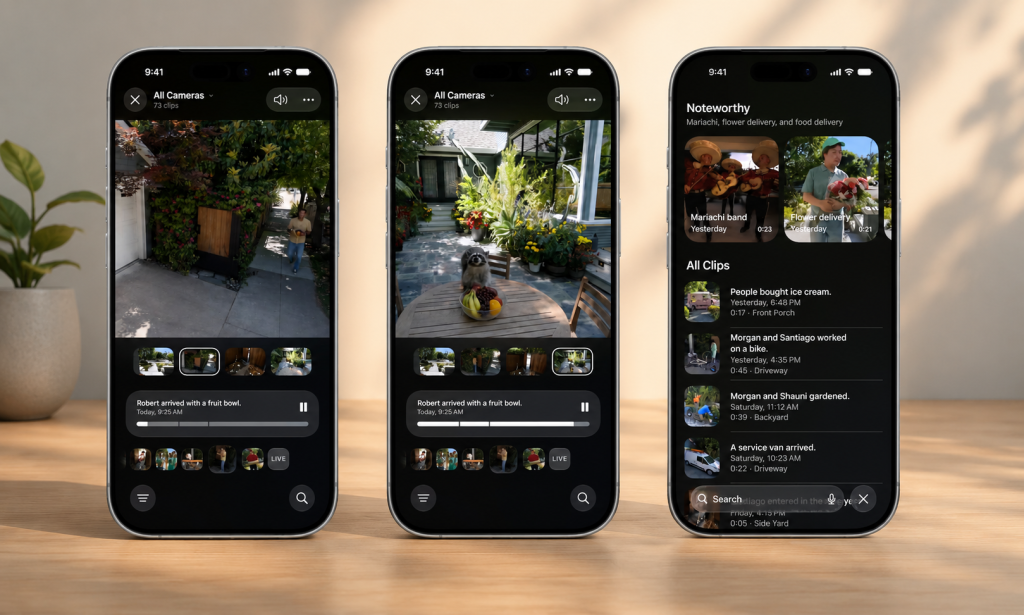
Second, notifications with a brain. Instead of “motion at the back door,” you get a description of the event, a person picked up a package, a dog crossed the yard, a car pulled in. The difference sounds small until you’ve lived through a windy day that fires forty motion alerts because a shrub got ambitious.
Third, natural-language search. “Show me the raccoon on the deck last night” is now a query, not a scrubbing session through a timeline of identical thumbnails.
Fourth, the Home app can connect related clips across cameras, so the delivery guy walking from the driveway camera to the doorbell camera becomes one event instead of three mystery alerts.
The question that matters, who sees your footage
Every one of those features requires software to look at your video and understand it. So the real question, the one I’d ask before turning any of it on, is where that looking happens and who is in the room.
Apple’s answer comes in two layers, and it’s worth understanding both.
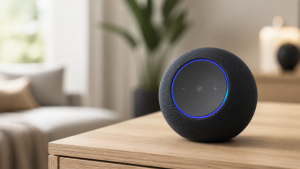
Layer one is the part HomeKit Secure Video has always done well. Your clips are analyzed by your own home hub, an Apple TV or HomePod sitting in your house, then stored end-to-end encrypted in iCloud. Encrypted in a way where Apple says it cannot view your recordings even if it wanted to, and the footage doesn’t count against your storage. That architecture is why I’ve always graded HSV kindly despite its feature gaps.
Layer two is new. The heavy AI lifting, the descriptions and the search, runs through Apple Intelligence, partly on your own devices and partly on what Apple calls Private Cloud Compute. That second part deserves a plain-English translation, because “we send your video to the cloud, privately” is exactly the sentence every camera company uses before doing something you’d hate.
Private Cloud Compute is Apple’s attempt at a cloud that’s built not to remember. The data is processed on Apple’s servers, never stored, not accessible to Apple staff, and the system is designed so outside researchers can verify those claims rather than take Apple’s word for it. Is it as private as never leaving your house? No. Local is local, and I said my piece about that in the vision essay, a home that watches in order to help is still a home that watches. But among the ways a camera company can handle your footage, this is the most honest architecture anyone is shipping at scale. Compare it to the industry default, upload everything, keep it warm on a server, and monetize the middle, and it isn’t close.
So does iOS 27 answer the privacy question? Mostly, yes. You’re still trusting Apple’s design instead of your own wiring, and the purist answer remains a fully local setup, the kind Home Assistant people build and I respect from a distance. But for a normal household that wants smart cameras without a research project, this is the best default on the market.
The catch, because there’s always a catch
Three asterisks before you get excited.
You need the Apple furniture. HomeKit Secure Video requires a home hub, meaning an Apple TV or HomePod, plus an iCloud+ subscription, which is where the “free upgrade” quietly assumes you’re already paying Apple monthly.
The camera list is still short. HSV-compatible cameras remain a small club, and iOS 27 does nothing to change that. Notably, there’s still no support for Matter cameras, even though the Matter spec added them this year. The walled garden got nicer inside. The walls are still walls.
And it’s fall software. Announced in June, shipping months later, and we’ve all watched Apple’s home promises slip before. I’ll believe the ship date when it ships.
The bottom line
Run it through the lens. Does it make life easier? Clearly, better alerts and searchable footage are the difference between a camera you check and a camera that tells you things. Does it recede? Yes, fewer junk notifications is the definition of receding. Does it cost you? Only what you’re likely already paying Apple. Does it respect you? More than anything comparable, with a cloud leg you should at least know exists.
Cameras are the most sensitive thing we bolt onto our homes. Apple just made its version smarter without making it creepier, and in this industry that counts as a minor miracle. For the other end of that spectrum, the one where the AI features arrive wearing a monthly fee and a map of states where they’re illegal, see what Blink just did.