Ask around in smart home circles for the one brand that just works and you will hear the same answer over and over: Lutron Caseta. It is not the flashiest system, it does not do color-changing party tricks, and it will never trend on social media. What it does is turn your lights on and off, every single time, for years, without drama. In a category full of gadgets that drop offline the week after you install them, that boring reliability is the whole pitch, and it is a very good one.
Here is the honest rundown after living with Caseta on the porch and a few rooms: what it nails, where it costs you, and who should actually buy it.
Installation: Genuinely Easy, Even in an Old House
Caseta is one of the few smart home upgrades that is friendlier than it looks. The switches do not require a neutral wire, which sounds like trivia until you open up a junction box in a house built before neutral wires were standard and realize half the smart switches on the market won’t work for you. Caseta sidesteps that entirely, which is why it is the default recommendation for older homes.
You wire the switch, plug in the Smart Bridge hub, scan a code, and you are running in well under an hour for a first switch. The Pico remotes that come in most kits stick to the wall with no wiring at all, so you can put a “light switch” anywhere you want one, including places that never had one.
Starter Kits and Pricing
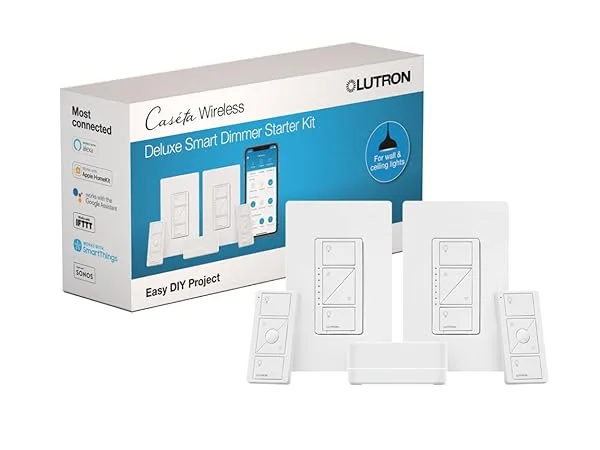
Caseta is sold as starter kits that bundle the Smart Bridge with a dimmer or two and a Pico remote, which is the right way to buy in because the Bridge is the piece that makes everything else work. The Diva dimmer kit is the popular entry point: a modern paddle-style dimmer, the hub, and a remote in one box. From there you add individual dimmers, switches, and remotes as you expand, and a single Bridge handles up to around 75 devices, which is far more than most homes will ever need.

- Wi-Fi-free operation
- Compatible with major brands
- Easy 15-min installation
- Control 10 devices remotely

- Control: App, voice, switch
- Smart Hub: Required for features
- Design: Modern, sleek finish
- Setup: Easy 3-way configuration

- Control: App & voice commands
- Compatibility: Alexa, Google
- Setup: Easy 3-way config
- Function: Precision dimming
It is not the cheapest way to make a light smart, and nobody pretends otherwise. You are paying for the hardware quality and the reliability, and in this category that trade is worth it.
Living With It Day to Day
The thing that wins people over is how little you end up thinking about it. The app is plain and fast, schedules fire when they should, and the physical Pico remotes mean the rest of the household never has to pull out a phone to dim the lights. That last part matters more than any feature list. A smart switch that confuses your family is a switch that gets ripped out. Caseta still works like a normal light switch first, and a smart one second, which is exactly the right order.
What It Actually Works With
Caseta plays well with the big platforms, and this is where it earns its keep as the connective tissue of a mixed-brand home. Through the Smart Bridge it works with Apple Home, Amazon Alexa, Google Home, and Samsung SmartThings, plus a useful supporting cast including Sonos, Ring, and Ecobee. So your lights can join scenes with your speakers, your doorbell, and your thermostat regardless of which camp you fall into.
Two honest caveats. First, the Smart Bridge hub is required. Caseta talks over Lutron’s own low-power radio rather than Wi-Fi, which is a big part of why it is so reliable, but it means the hub is not optional. Second, as of 2026 Caseta does not speak Matter. If a Matter-native setup is a hard requirement for you, that is the one box Caseta does not tick. For nearly everyone else, the platform support above covers what you actually use.
Reliability: The Whole Reason It Exists
This is the part that does not photograph well and matters most. Caseta uses Lutron’s Clear Connect radio instead of riding your Wi-Fi, so it is not fighting your laptop, your kid’s tablet, and forty other gadgets for bandwidth. The practical result is that commands just land. Lights respond instantly, schedules don’t quietly stop working, and you are not power-cycling a hub every few weeks. Years in, the most common review of Caseta is that people forget it is there, which is the highest compliment a smart home product can earn.
Accessories Worth Knowing About
Beyond wall switches, Caseta covers the odd jobs. There are plug-in lamp dimmers for fixtures you can’t or don’t want to hardwire, so a floor lamp in the corner becomes part of the same system as your overhead lights. The Pico remotes can be mounted, handheld, or clipped into a car visor, and they can control single lights or whole scenes.

- Control: Voice, App, Wall
- Connectivity: No Wi-Fi needed
- Compatibility: Works with many
- Power: Up to 300 Watts

- IP65 Weatherproof Rating
- Control via Lutron App
- Works with Lutron Hub
- Polycarbonate Durable Body

- Control: App, voice, wall
- Compatibility: Alexa, Apple, Google
- Power: 300W incandescent max
- Setup: Easy 3-way installation
The Verdict
Lutron Caseta is the answer when the question is “what will still be working in five years.” It is not the cheapest and it is not the most exciting, and if you need color or a Matter-only setup it is not your match. But for rock-solid, no-neutral-required smart lighting that the whole family can actually use and that talks to whichever ecosystem you have already bought into, nothing else in this price range is as dependable. Start with a Diva kit in your most-used room, see how quickly you stop thinking about it, and expand from there.